
A Blesta module is the bridge between Blesta and the system that actually delivers what you sell. When a customer pays for a hosting plan, the cPanel module creates the account. When they stop paying, it suspends it. Blesta ships with modules for the common control panels and registrars, but if you sell something they don’t cover, a custom module is how you automate it. This guide explains how Blesta module development works, walks through the methods that matter with a real example, and helps you decide when it’s worth doing.
What a Module Does
A module answers one question for Blesta: “How do I create, change, suspend and remove this service on the other system?” Everything else, from billing and invoices to the order form and the client area, is Blesta’s job. That clear split is why Blesta module development usually turns out smaller than people expect.
Typical things hosts build modules for:
- A control panel or VPS platform without an official Blesta module
- Software licenses issued by your own license server
- Accounts on an internal system, such as a backup service or email platform
- A domain registrar Blesta doesn’t support yet
- Game servers, voice servers or other services with their own control panel and API
Module or Plugin?
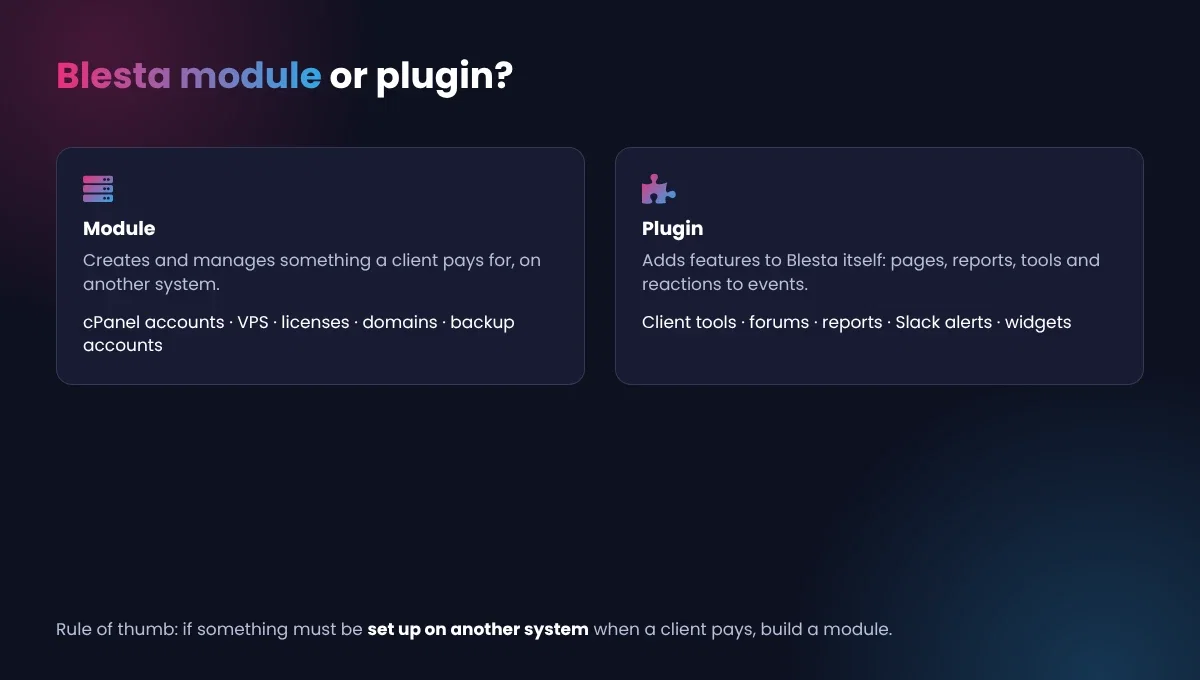
If it creates or manages something a client pays for, it’s a module. If it adds features to Blesta itself, such as pages, reports or tools, it’s a plugin. Getting this right at the start saves a rewrite later. Our Blesta plugin development guide covers the other side, and some products use both: a module to provision the service and a plugin to add extra client tools around it.
Servers, Packages and Services
Three ideas run through all Blesta module development:
- Module rows are the connections, usually one per server, holding the hostname and API credentials. Rows can be grouped so Blesta spreads accounts across servers. Our Blesta cPanel guide shows this from the admin’s side.
- Packages are what you sell. The module adds its own options to the package form, such as which plan on the remote system to use.
- Services are a client’s instance of a package. The module stores details like the remote username on the service.
The Files in a Module
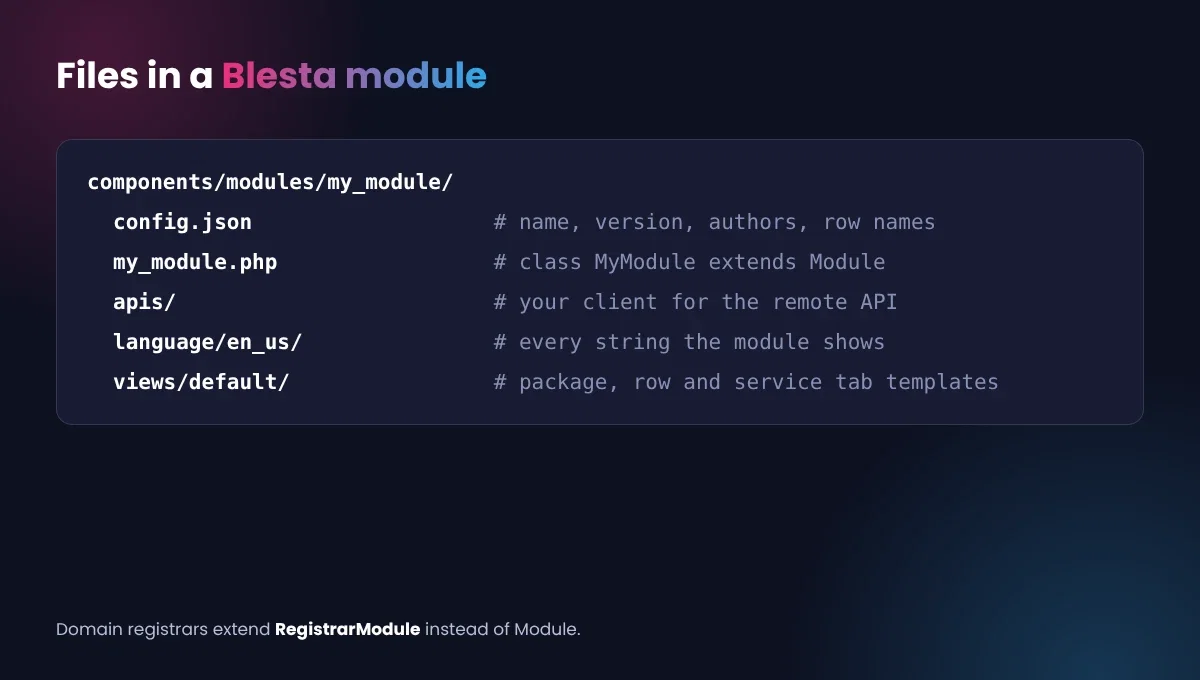
A module is a class that extends Blesta’s Module class (or RegistrarModule for domain registrars) and lives in components/modules/your_module/, alongside a config.json, language files and views. In Blesta module development, most modules also keep a small API client in their own folder, so the code that talks to the remote system stays separate from the code that talks to Blesta.
The Methods That Matter in Blesta Module Development
Blesta’s module methods reference splits methods into required and optional. The required ones are mostly naming: getName(), getVersion(), getAuthors(), getServiceName() and a few that describe what a “server” and “server group” are called. Many of these can be set in config.json instead of code.
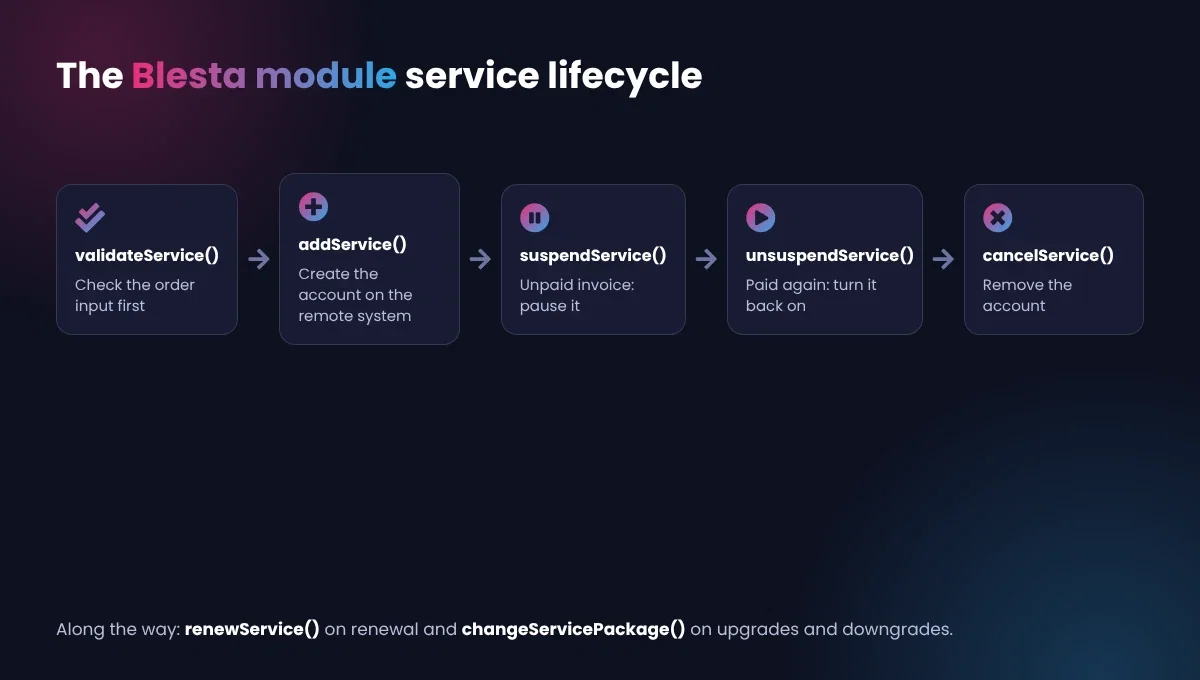
The optional ones are where the real work happens, and any useful module needs most of them:
| Method | Called when |
|---|---|
validateService() | Check order input before anything is created |
addService() | A paid order is activated: create the account |
editService() | An admin changes the service |
suspendService() | The service is suspended, usually for non-payment |
unsuspendService() | Payment arrives and the service comes back |
cancelService() | The service is canceled: remove the account |
renewService() | The service renews |
changeServicePackage() | The client upgrades or downgrades |
There are also methods for the forms admins and clients see, like getPackageFields() and getAdminAddFields(), for adding and editing module rows, and for tabs on the service page, such as getClientServiceTabs(), so clients can manage their service without leaving your client area.
A Simplified addService() Example
Here’s the shape of addService(), following the pattern in Blesta’s documentation. It validates input, creates the account only when the admin chose to use the module, logs the API call, and returns the fields Blesta should store on the service:
public function addService($package, array $vars = null, $parent_package = null, $parent_service = null, $status = 'pending')
{
    $row = $this->getModuleRow();

    $this->validateService($package, $vars);
    if ($this->Input->errors()) {
        return;
    }

    $username = $vars['my_module_username'] ?? '';
    $password = $vars['my_module_password'] ?? '';

    if (isset($vars['use_module']) && $vars['use_module'] == 'true') {
        $api = $this->getApi($row->meta->hostname, $row->meta->api_key); // your own helper
        $this->log($row->meta->hostname . '|create', serialize(['username' => $username]), 'input', true);
        $result = $api->createAccount($username, $password, $package->meta->plan);
        $this->log($row->meta->hostname . '|create', serialize($result), 'output', $result['success']);

        if (!$result['success']) {
            $this->Input->setErrors(['api' => ['create' => $result['message']]]);
            return;
        }
    }

    return [
        ['key' => 'my_module_username', 'value' => $username, 'encrypted' => 0],
        ['key' => 'my_module_password', 'value' => $password, 'encrypted' => 1]
    ];
}
Notice that the password is logged nowhere and stored with 'encrypted' => 1. The use_module check matters too: when an admin adds a service by hand to import an existing account, they can leave it off so Blesta records the service without creating anything remotely.
Giving Clients Their Own Controls
The best modules don’t stop at provisioning. Service tabs let clients act on their service from your client area: reboot a VPS, reset a password, view usage or open the remote control panel with single sign-on. Each tab is a method that returns a view, and Blesta adds it to the service page automatically. Good tabs cut support tickets, because clients can fix common problems themselves instead of waiting for you. In Blesta module development, this is often where a module goes from “works” to “customers love it”.
Selling a Module
If other hosts sell the same service, your module may be worth selling. Write a short README with setup steps, list the PHP and Blesta versions you support, and keep a changelog. Consider a license check so only paying customers get updates, and price support separately so ongoing Blesta module development stays funded as the remote API and Blesta both change.
Building One Well
- Validate first, create second. Catch bad usernames or missing options in
validateService(), before anything is created on the remote system. - Log every API call. Blesta has a module log under Tools > Logs. When an account fails to create, that log is the first place an admin looks. Mask passwords and keys before logging.
- Handle “already exists” gracefully. If an admin retries a failed activation, your module shouldn’t create a second account.
- Store secrets encrypted. Mark API keys as encrypted fields in the module row so they aren’t saved in plain text.
- Return clear errors. Use
Input->setErrors()with a message an admin can act on, such as “Plan ‘starter’ not found on server”, not just “API error”. - Start from an example. For your first Blesta module development project, Blesta publishes example modules, and the Extension Generator can create a starting skeleton.
Testing Your Blesta Module Development Work
Testing is where Blesta module development projects succeed or fail. Use a test account or sandbox on the remote system, never your production server, and walk every path: add a module row, create a package, place an order, pay it, suspend, unsuspend, upgrade, downgrade and cancel. After each step, check both Blesta and the remote system agree. Then try the unhappy paths: a wrong API key, a server that’s offline, a username that’s already taken. A module that fails clearly is far easier to support than one that fails silently.
Is Custom Blesta Module Development Worth It?
Count the minutes. If you set up a service by hand ten times a month and each takes fifteen minutes, that’s two and a half hours a month, plus the suspensions you forget and the welcome emails sent late. A module does all of it the moment an invoice is paid. For anything you sell regularly, Blesta module development usually pays for itself within months, and it makes your business feel faster to customers from day one.
Before you start, check that the remote system has an API that can create, suspend, unsuspend and delete accounts. If it can’t, no module can automate it, and Blesta module development won’t help until the vendor adds those calls.
Frequently Asked Questions
Can a WHMCS provisioning module be converted to Blesta?
The API calls to the remote system usually carry over almost unchanged. The parts that talk to WHMCS need rewriting to Blesta’s module methods. Our WHMCS provisioning modules guide explains the WHMCS side.
How long does Blesta module development take?
It depends mostly on the remote system’s API. A clean, well-documented API with create, suspend and delete calls makes for a small project. Client-facing extras, like a control panel tab or single sign-on, add time.
Can one module handle several servers?
Yes. Each server is a module row, and rows can be grouped. When a new order comes in, Blesta picks a row from the package’s group, so you can add capacity by adding a server instead of changing any code. Your module can also choose the row itself with selectModuleRow() if you need smarter placement, such as filling the least busy server first.
Do I need to update my module when Blesta updates?
Usually not for minor releases. For major versions, test on a dev copy first, especially any views, since Blesta 6 moved the staff area to Bootstrap 5.
Can you handle Blesta module development for us?
Yes. Tell us what you sell and what it runs on, and see our Blesta plugins and guides.

