

SIDEKICK FOR AMP
The Blesta game server module that sets servers up for you.
Sidekick for AMP is a Blesta game server module that connects Blesta to CubeCoders AMP. When a customer orders, Sidekick deploys their game server on your AMP host, creates their panel login and emails them the address. Suspend, unsuspend, cancel and upgrades follow billing on their own, and customers get Start, Stop, Restart and live graphs right in your Blesta client area.
One license per Blesta install · first 12 months of updates & support included
Tested on Blesta 6.0.4 and AMP 2.8 · Minecraft and Palworld tested live · Per-slot billing · Uptime alerts · Multi-company ready
Why Hosts Add a Blesta Game Server Module
No more manual setups
Orders become running game servers on their own, even at 3 AM. Pick a template once per package and every new customer gets the same server, set up the same way.
Sell slots like the big hosts
Charge per player slot with a Blesta Quantity option. The slot count becomes the server’s player limit, and customers can buy more any time.
Fewer “is it down?” tickets
Customers see their server’s state, CPU, RAM and players in Blesta and can restart it themselves. You get an email if an AMP server stops answering.

Everything in One Blesta Game Server Module
Provisioning
Deploys from your AMP templates on order · Creates the customer’s AMP login · Location tags to pick the right AMP node · Works with more than one AMP server · Cancel removes the server, even mid-deploy
Billing
Suspend and unsuspend follow Blesta billing · Upgrades and downgrades between plans · Per-slot pricing with Quantity options · Sell RAM or any AMP setting as a configurable option
Customer controls
Start, Stop and Restart in the client area · Live CPU, RAM and player graphs · Server address and panel button on the service page · Welcome email with the address and login
Monitoring
Connection check every 15 minutes · Email when an AMP server goes down, every 6 hours while it’s down, and when it’s back · Alerts for orders that never finish deploying
Capacity
Set a RAM budget per AMP server · Blocks orders that would oversell it · Warning email at 90% full · RAM sold shown on your server list
Security
HTTPS with certificate checks · Session tokens and passwords kept out of logs · Customers only ever see their own server · Clear errors for staff, plain messages for customers


Built the Blesta Way
Sidekick is a native Blesta 6 module, built on Blesta’s own pieces, so it behaves like the rest of your install:
Blesta’s own styles
Every page uses Blesta 6’s built-in styles and icons, so it fits your theme, light or dark, with no extra stylesheet.
Runs on Blesta’s cron
The connection check runs as a Blesta automation task. No extra cron job, and you can change how often it runs under Settings → Company → Automation.
Multi-company ready
Each company keeps its own AMP servers, alerts and RAM budgets. One license key covers every company on the install.

Who This Blesta Game Server Module Is For
- Game server hosts on Blesta who already run AMP and are tired of setting up every order by hand.
- Web hosts adding game servers as a new product, using the Blesta install they already bill from.
- Gaming communities and clans that rent servers to their members and want billing, slots and controls in one place.
Which Games Work?
Any game AMP can run from a deployment template works with Sidekick. We’ve tested Minecraft Java Edition and Palworld live, including per-slot billing. Games that download anonymously through SteamCMD, like Palworld, Rust, Valheim, 7 Days to Die and Project Zomboid, need nothing extra. A few dedicated servers, DayZ for example, need a Steam account that owns the game, so plan on a separate Steam account just for your servers if you sell those.
Running Blesta and want to see everything else we make for it? Browse our Blesta plugins and guides.
Staff Dashboard Widget
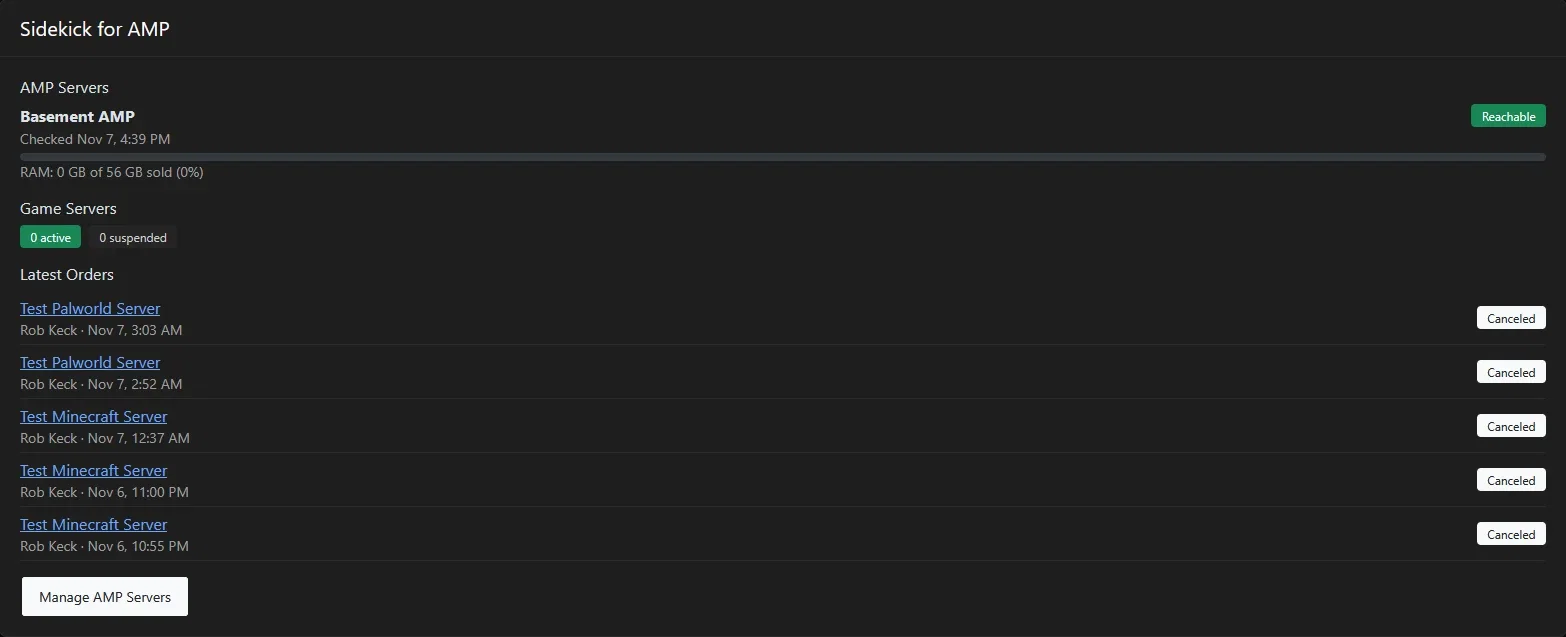
Sidekick comes with Sidekick Dashboard, a free companion plugin that puts a Sidekick for AMP box on your Blesta staff dashboard. You see every AMP server’s status and when it was last checked, RAM sold against each server’s budget, how many game servers are active, suspended or still deploying, and the 5 latest orders with whether each one deployed. It only reads what Sidekick already stores, so it never slows down your AMP servers.
Install, Update and Use Sidekick for AMP
Sidekick for AMP 0.8.2
Sidekick connects Blesta to CubeCoders AMP. Orders deploy game servers from your AMP templates, billing drives suspend, unsuspend, cancel and upgrades, and customers control their server from the Blesta client area.
Requirements
- Blesta: 6.0 or newer (tested on 6.0.4)
- PHP: 8.3 or 8.4. The download includes a build for each.
- ionCube Loader: v15 or newer
- PHP extensions: cURL and OpenSSL
- CubeCoders AMP: 2.8 or newer, with an Enterprise license (CubeCoders’ terms only allow selling game servers on Enterprise; Advanced can’t be used for resale)
- Network: your Blesta server must reach your AMP panel. HTTPS is strongly recommended.
- Cron: Blesta’s cron job running (Settings → System → Automation)
What’s in the download
- Sidekick-for-AMP-0.8.2-php83.zip
- Sidekick-for-AMP-0.8.2-php84.zip
Use the one that matches the PHP version your Blesta install runs on. Not sure which? Check the PHP version in your hosting control panel, or ask your host.
Install Sidekick
In AMP
- Create an AMP user for Blesta to log in with, without two-factor authentication.
- Create a Template Role for your customers and set its permissions inside an instance (Start, Stop, Console and so on).
- Create a Deployment Template for each game or plan, with that customer role and any settings it needs, such as the memory setting.
In Blesta
- Upload the zip that matches your PHP version to the root of your Blesta install and extract it. It adds the folders components/modules/cubecoders_amp and plugins/sidekick_dashboard.
- Go to Settings → Company → Modules → Available, find Sidekick for AMP and click Install. The connection check task is added for you.
- Click Manage, open the License tab, enter your license key (it’s in your K & K client area under Services) and click Save and check.
- On the Servers tab, click Add Server and enter your AMP address, the Blesta AMP user, an alert email and, if you like, a RAM budget.
- Create a package with Module: Sidekick for AMP, pick the AMP server and deployment template, and set the RAM per Server.
- Optional: add a Quantity configurable option named after the game’s player-limit setting to sell player slots. The README in the download lists the setting names.
- Optional: for the staff dashboard widget, go to Settings → Company → Plugins → Available, find Sidekick Dashboard and click Install. Then open the staff dashboard, click Manage Dashboard Widgets and turn on Sidekick for AMP. On a multi-company install, do this in each company.
New to Blesta modules? Our guide on how to install a Blesta plugin covers the upload and install steps.
Update to a new version
- Download the new version from your K & K client area, picking the build that matches your PHP version.
- Upload it to the root of your Blesta install and extract it over the old files. Don’t uninstall first.
- In Blesta, go to Settings → Company → Modules → Installed and click Upgrade on Sidekick for AMP. On a multi-company install, do this in each company.
- Updating from 0.8.1 or earlier? The zip now also includes Sidekick Dashboard. Install it once under Settings → Company → Plugins → Available, then turn on the Sidekick for AMP widget under Manage Dashboard Widgets.
Your servers, packages, services and license are kept.
Updates and support
Your first 12 months of updates are included. After that, updates and support renew at $19.99/year. If you don’t renew, servers you already sold keep running and customers can still start, stop and restart them, but Sidekick stops creating new servers until the license is renewed.
Using Sidekick
Your customers
- After ordering, customers get a welcome email with their server address and AMP panel login.
- The service’s Server Controls tab shows live CPU, RAM and player graphs, the server state and address, and Start, Stop and Restart buttons.
- Customers can buy more player slots or RAM from Blesta, and the change is applied to their running server.
You and your staff
- The same Server Controls tab is on every service in the Blesta admin.
- The Servers list shows each AMP server as Reachable or Can’t reach AMP, when it was last checked, and how much RAM is sold.
- Alert emails go to the Alert Email on each server: down, still down every 6 hours, back up, stuck deploys and 90% capacity.
- If a license lapses, customers’ existing servers keep running and their controls still work. Only new deploys pause until the license is active again.
Changelog
0.8.2November 7, 2026
- New: Sidekick Dashboard, a staff dashboard widget, now comes in the same zip as a small companion plugin. It shows each AMP server’s status and RAM sold, game server counts, and the 5 latest orders with whether each one deployed. Install it under Settings → Company → Plugins, then turn it on under Manage Dashboard Widgets.
- No changes to the module itself.
0.8.1November 7, 2026
- First public release.
- Automatic deploys from AMP templates, with suspend, unsuspend, cancel and upgrades following billing.
- Server Controls tab for customers and staff: Start, Stop, Restart and live CPU, RAM and player graphs.
- Configurable options for RAM, player slots and any AMP setting, plus location tags.
- Connection check with down, back-up, stuck-deploy and capacity alert emails.
- RAM budget per AMP server to stop overselling.
- Multi-company support, with one license per Blesta install.
Sidekick for AMP, the Blesta game server module
One price. Every feature.
- Automatic game server deploys from AMP templates ✅
- Suspend, unsuspend, cancel and upgrades follow billing ✅
- Start, Stop, Restart and live graphs for customers ✅
- Per-slot billing and RAM options ✅
- Uptime and capacity alert emails ✅
- Multi-company, one license per install ✅
- PHP 8.3 and 8.4 builds ✅
- 12 months of updates and support included ✅
$29.99. After the first year, updates & support renew at $19.99/year. If you don’t renew, existing servers keep running, but Sidekick won’t create new servers until you renew.
Questions Game Hosts Ask First
Do I need my own CubeCoders AMP license?
Yes. Sidekick connects Blesta to your AMP panel; it doesn’t include AMP. You need an AMP license that can run multiple instances.
Is this made by CubeCoders?
No. Sidekick for AMP is built and supported by K & K Web Services. It isn’t affiliated with or endorsed by CubeCoders Limited.
Which games does this Blesta game server module support?
Any game AMP can deploy from a template. Minecraft and Palworld are tested live. Games that need a Steam login to download, such as DayZ, need a separate Steam account for your servers.
Can I sell player slots?
Yes. Add a Blesta Quantity option named after the game’s player-limit setting. Customers pay per slot, and the server’s player limit follows what they bought.
Can customers change settings I sell, like slots or RAM, in AMP?
Not if you set up the customer role the way the README shows. Leave settings you sell switched off in the role, so customers change them through Blesta, where they pay for them.
What happens if my license lapses?
Existing servers keep running and customers keep their controls, suspend, unsuspend and cancel. Only new deploys pause until the license is active again.
Does it work with more than one Blesta company?
Yes. Each company keeps its own AMP servers and settings, and one license key covers every company on the install.
More Blesta Plugins From K & K
Also from K & K: the free Blesta forum plugin and our Blesta guides. Sidekick for AMP is a Blesta game server module by K & K Web Services. Not affiliated with or endorsed by CubeCoders Limited, Phillips Data, Inc. or Blesta.
