

CADDIE FOR CLIENTEXEC
31 tools your clients will actually log in for, now in Clientexec.
Caddie is a Clientexec tools plugin that puts uptime monitoring, SSL and domain expiry alerts, DNS checks, email deliverability tools, SEO scans and QR codes right inside your Clientexec client portal. Your clients get real reasons to log in every week, and every tool can point them back to your hosting plans. It’s the same 31 tools as Caddie for WHMCS, Caddie for Blesta and Caddie for WISECP, rebuilt as a native Clientexec snapin.
$29.99 the first year · then $19.99/year for updates & support
Built for Clientexec 7.3 · Alerts through Clientexec email templates · English, Spanish & Turkish · Zero new client accounts
Why Hosts Add a Clientexec Tools Plugin Like Caddie
More logins, less churn
Clients who check their SSL expiry, uptime and email setup inside your Clientexec client portal see your brand every week instead of once a year at renewal.
Fewer “is it you or me?” tickets
When a client can run a DNS propagation check, blacklist lookup or SPF test on their own, a lot of tickets answer themselves before they’re opened.
Built-in upsells
Each tool can show a short “we can fix this for you” line linking to your hosting, reseller or design plans. Edit each tool’s wording in the Clientexec admin, or turn them off.

All 31 Tools in One Clientexec Plugin
Monitoring
Uptime Monitor with email alerts · Heartbeat Monitor for cron jobs and backups · SSL & Domain Expiry Alerts · Weekly Site Report email · Website Change Monitor · Status Page Generator
Website, SEO & Performance
SEO Snapshot · Core Web Vitals · Meta Tag Preview · robots.txt & Sitemap Validator · Accessibility Checker · Broken Link Checker · Mixed Content · Security Headers · Redirect Chain
Domains, DNS & SSL
Domain Name Suggester with your own Clientexec domain prices · DNS Migration Comparison · DNS Propagation across Google, Cloudflare & Quad9 · WHOIS & Expiration · SSL Certificate Checker · Blacklist & IP Reputation
Email Deliverability
Email Deliverability Checker (SPF, DKIM, DMARC, including subdomains that inherit their parent domain’s DMARC policy) · SPF & DMARC Record Builder with the 10-lookup check · DMARC Report Analyzer · BIMI & MTA-STS Checker
Hosting & Business
Reseller Hosting Profit Calculator · What Hosting Plan Do I Need? quiz · Migration Savings Calculator · cPanel/WHM Migration Checklist
Marketing
Dynamic QR Codes & Short Links: change where a printed QR code points any time, with scan and click stats by day, device and source · Favicon & Social Image Generator


Built the Clientexec Way
Caddie isn’t a WHMCS addon squeezed into Clientexec. It’s a Clientexec tools plugin built on Clientexec’s own building blocks, so it behaves like the rest of your install:
Alerts are Clientexec email templates
Down, recovered, missed-heartbeat, failure and expiry emails, plus the weekly site report, go out through Clientexec’s own mailer and mail settings, and show in each client’s Emails log. Reword them under Settings → Email Templates.
Runs on Clientexec’s cron
The “Caddie Monitors” automation service runs on Clientexec’s own cron every minute. Uptime checks space themselves out to about every 5 minutes, and heartbeat, expiry and weekly report checks run on their own schedules. No extra cron job to add.
English, Spanish & Turkish
Screens and the main tools follow each user’s Clientexec language, and the alert emails and weekly report go out in your Clientexec language, with Spanish and Turkish wording built in.
Leads report
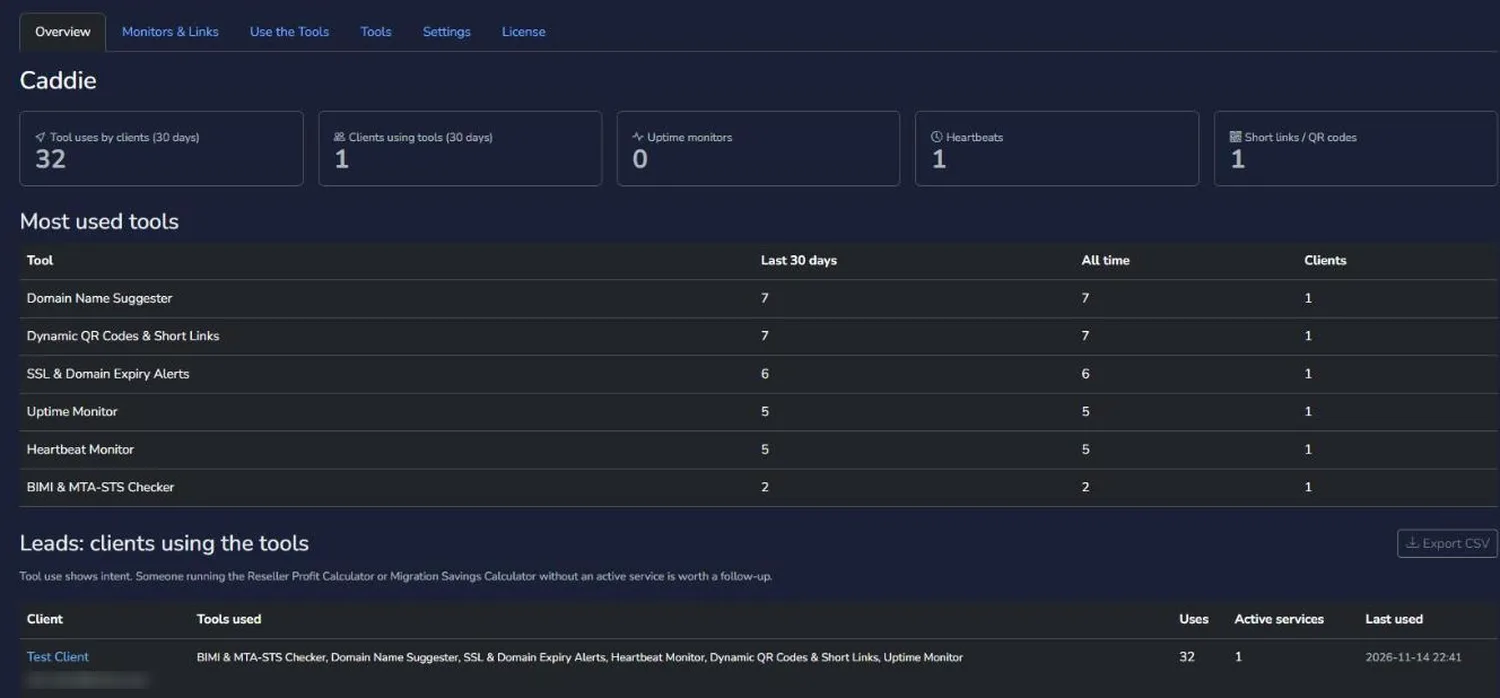
See which clients use which tools and whether they have an active package. Someone running the Reseller Profit Calculator with no reseller plan is a warm lead. Export it all to CSV.
You decide who gets what
Turn any tool on or off for clients and staff separately. Open the tools to every client, only clients with an active package, or only clients on specific products.
Fits your theme
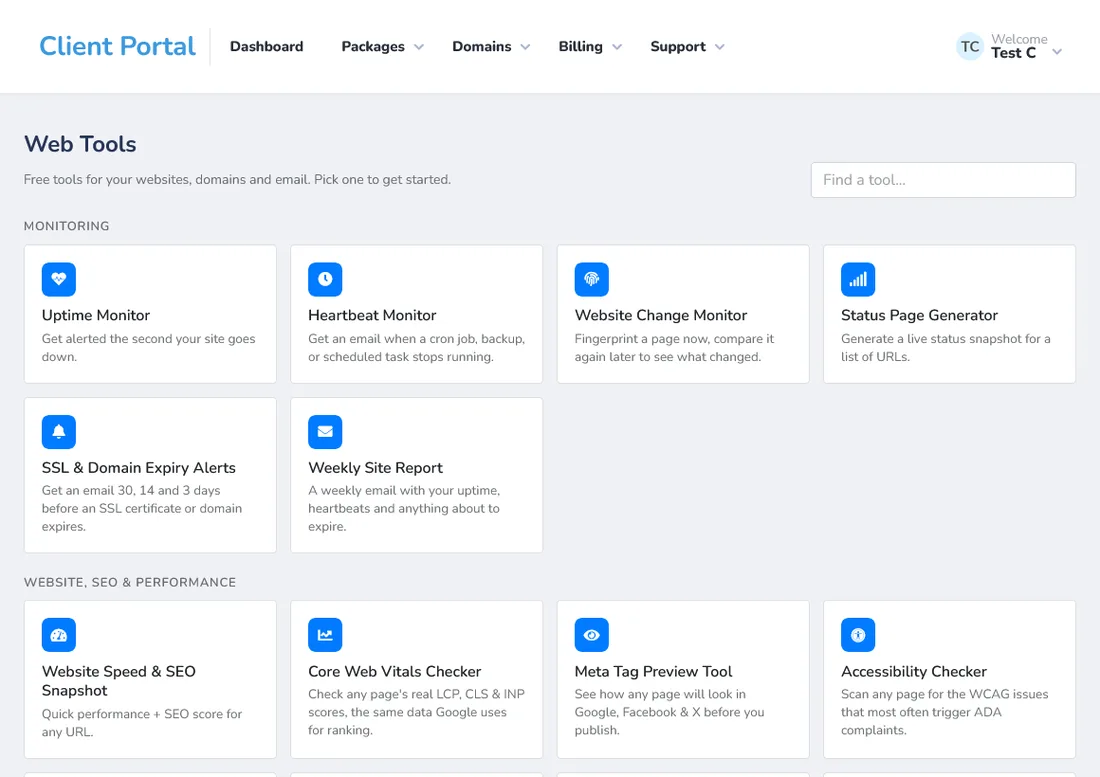
The Match Clientexec theme uses your client portal’s own fonts, buttons, cards and colors, pages sit in the portal like Clientexec’s ticket pages, and confirm prompts use Clientexec-style dialogs. Prefer Caddie’s own look? Switch to Caddie Light or Dark with your own accent colors.
Right where staff expect it
Staff open the Clientexec tools plugin under Accounts → Caddie in the Clientexec admin, and clients find it under Support → Web Tools plus a tile on the client portal home page.
Safe by default
Every form post is token-checked, and tools refuse to fetch private or internal addresses, even through DNS tricks, so clients can’t use them to probe your server’s network.
Public links that just work
Short links, QR codes and heartbeat ping URLs are served by a small public page inside the plugin, so they work for anyone without a login.

Who This Clientexec Tools Plugin Is For
- Shared and reseller hosts who want a Clientexec tools plugin that gets clients logging in more than once a year, and fewer “is my site down?” and “why is my email going to spam?” tickets.
- Web designers and agencies on Clientexec who want to hand clients uptime alerts, SSL checks and SEO scans under their own brand, instead of sending them to third-party sites.
- Hosts serving Spanish and Turkish clients who want the screens and alerts in those languages from day one.
- Hosts moving from WHMCS, Blesta or WISECP who already use Caddie there and want the same tools after the switch.
Turn Tool Use Into Sales With the Leads Report
Every time a client opens a tool, this Clientexec tools plugin records it. The admin Overview then shows who used which tools in the last 30 days, and whether they have an active package with you. That turns a free tool into a sales signal.
A client running the Reseller Hosting Profit Calculator three times this week, with no reseller plan, is thinking about starting a hosting business. A client who keeps checking the Migration Savings Calculator is comparing hosts. Someone using the SPF & DMARC Record Builder may need help with email. Each of those is a reason for a friendly, well-timed follow-up, and the CSV export makes it easy to hand the list to whoever does your sales.
Caddie for Clientexec vs Caddie for WHMCS, Blesta and WISECP
The 31 tools are the same, and so are the uptime and heartbeat checks, the QR codes and the Leads report. What changes is how Caddie fits into the platform. In Clientexec, Caddie is a snapin under Accounts in the admin and Support in the client portal, alerts are Clientexec email templates sent through Clientexec’s mailer, monitors run as a Clientexec automation service, and the Domain Name Suggester reads your Clientexec domain products. It also ships with Spanish and Turkish. It’s a native Clientexec tools plugin, not another platform’s code wrapped to run somewhere else.
Need something Clientexec doesn’t do yet? We also take on custom Clientexec plugin development.
Install, Update and Use Caddie for Clientexec
Caddie for Clientexec 1.0.0
Caddie is a Clientexec tools plugin that adds 31 website, DNS, email, monitoring and business tools to your Clientexec client portal. Clients log in with their normal Clientexec account, and everything runs on Clientexec’s own email templates, mailer, cron and admin area.
Requirements
- Clientexec: 7.3 or newer
- PHP: 8.3 or 8.4. The download includes a build for each.
- ionCube Loader: v15 or newer
- PHP extensions: cURL, OpenSSL, mbstring, PDO MySQL, ZipArchive, SimpleXML, XMLReader and GD
- Network: outbound access on ports 443 (HTTPS) and 53 (DNS), so the tools can reach the sites and DNS servers they check
- Cron: Clientexec’s cron job running
- Email: Clientexec’s Mail Configuration set up so its own emails are delivered (SMTP recommended)
What’s in the download
- Caddie-Clientexec-v1.0.0-PHP8.3.zip
- Caddie-Clientexec-v1.0.0-PHP8.4.zip
Use the one that matches the PHP version your Clientexec install runs on. Not sure which? Check the PHP version in your hosting control panel, or ask your host.
Install the Clientexec tools plugin
- Upload the zip that matches your PHP version to the main folder of your Clientexec install (the folder with config.php in it) and extract it there. It adds two folders: plugins/snapin/caddie and plugins/services/caddiemonitors.
- In the Clientexec admin, go to Settings → Plugins → Snapins, choose Caddie, set Enabled to Yes, and turn on Viewable by all staff and Viewable by all customers (or pick groups). The database tables and email templates are set up for you.
- Go to Settings → Plugins → Automation Services, choose Caddie Monitors, set Enabled to Yes and leave every run schedule field at *. This runs the monitors and sends the alert emails.
- Open Accounts → Caddie → Settings and:
- enter your License Key (it’s in your K & K client area under Services)
- choose Who Can Use the Tools: any client, clients with an active package, or clients on specific products
- fill in your Hosting Plans URL, Reseller Plans URL and Web Design URL. The upsell lines and the hosting quiz link to these.
- optional: add a free Google PageSpeed API key for the Core Web Vitals tool
That’s it. Clients now see Web Tools under Support and as a tile on the client portal home page, and the monitors run with your existing Clientexec cron job.
Update the Clientexec tools plugin
- Download the new version from your K & K client area, picking the build that matches your PHP version.
- Upload it to the main folder of your Clientexec install and extract it over the old files. Don’t turn the snapin off first.
- Check that Caddie is still enabled under Settings → Plugins → Snapins and Caddie Monitors under Automation Services.
Your settings, monitors, short links, QR codes and history are kept. New email templates are added automatically, and templates you’ve already edited are left as they are.
Updates and support
Your first 12 months of updates and support are included. After that, updates and support renew at $19.99/year.
Using the Clientexec tools plugin
Your clients
- Clients open Support → Web Tools (or the Web Tools tile on the portal home page) and see every tool you’ve turned on, grouped by category and searchable.
- Uptime monitors, heartbeats and SSL & domain expiry watches email the client through Clientexec’s mailer, and each email shows in the client’s Emails log.
- Clients who use a monitor can get the Weekly Site Report email, and can turn it on or off, preview it, or send themselves a copy.
- The Domain Name Suggester shows the domain extensions you sell in Clientexec with your own prices, and its Register button goes to your order page.
Your staff (Accounts → Caddie)
- Overview: tool usage, plus the Leads report showing which clients use which tools and whether they have an active package. Export it to CSV.
- Monitors & Links: every uptime monitor, heartbeat, expiry watch and short link across all clients.
- Use the Tools: staff can run every tool themselves.
- Tools: turn each tool on or off for clients and staff, and edit each tool’s upsell line.
- Settings and License: access, limits, theme, the weekly report day, and license, monitor and email status.
Emails
Reword any Caddie email under Settings → Email Templates. They’re the templates whose names start with “Caddie:”.
Changelog
1.0.0November 14, 2026
- First Clientexec release, with all 31 tools from Caddie for Blesta 1.1.1.
- Clientexec snapin: Accounts → Caddie for staff, Support → Web Tools and a portal home tile for clients.
- “Caddie Monitors” automation service for uptime, heartbeats, expiry checks, weekly reports and alert emails.
- 8 alert emails as Clientexec email templates, sent through Clientexec’s mailer.
- Public short links, QR codes and heartbeat pings with no login needed.
- Domain Name Suggester reads your Clientexec domain products and prices.
- Spanish and Turkish screens, emails and main tools.
- Clientexec-style pages and confirm dialogs in the admin and client portal.
- Security: private-address guard with pinned connections, and a token check on every form post.
Caddie, the Clientexec tools plugin
One price. Every tool.
- All 31 client tools ✅
- Uptime & heartbeat monitoring with Clientexec email alerts ✅
- SSL & domain expiry alerts and a weekly site report email ✅
- Dynamic QR codes & short links ✅
- Admin Leads report + CSV export ✅
- Per-tool and per-product access control ✅
- English, Spanish and Turkish ✅
- 12 months of updates and support included ✅
$29.99 the first year. After that, updates & support renew at $19.99/year.
Questions Clientexec Admins Ask First
Do my clients need a new account?
No. Caddie is a Clientexec tools plugin, so it runs inside the Clientexec client portal and uses the login your clients already have.
Why are there two parts?
Caddie itself is a snapin for the client and admin pages. Caddie Monitors is a small automation service that runs the uptime, heartbeat and expiry checks and sends the alert emails on Clientexec’s cron. Turn both on.
How do the uptime and heartbeat monitors run?
Through the “Caddie Monitors” automation service on the cron Clientexec already needs. Heartbeat failure pings are recorded the moment they arrive, and the alert goes out on the next run, usually within a minute.
Can I limit the tools to paying customers?
Yes. The Clientexec tools plugin lets you choose any logged-in client, clients with an active package, or clients on specific products. You can also switch individual tools off.
Can I reword the alert emails?
Yes. They’re normal Clientexec email templates under Settings → Email Templates, named “Caddie: …”. Edited templates are kept when you update.
Which languages does it support?
This Clientexec tools plugin supports English, Spanish and Turkish for its screens, alert emails and weekly report.
Do printed QR codes keep working if I change the destination?
Yes. Every QR code from the Clientexec tools plugin points at your short link, and you can change where the short link goes at any time.
I already own Caddie for WHMCS, Blesta or WISECP. Is this the same license?
No. Caddie for Clientexec is a separate plugin with its own license, built natively for Clientexec.
Is there a free version?
Not for this Clientexec tools plugin at the moment, but you can try most of the tools for free on our tools site, knkws.dev, before you buy.
More From K & K for Clientexec
Caddie is a Clientexec tools plugin by K & K Web Services. Not affiliated with or endorsed by Clientexec.
